Two old Kindles as a home dashboard: a jailbreak, a long-poll and a lot of eips
Convirtiendo un Kindle Keyboard de 2010 y un Kindle Touch de 2011 en pantallas siempre encendidas para música, clima, noticias y la casa.
JT (Jess)Traducido del inglés por un modelo de IA local (Gemma 3 12B (local)). Leer el original · ¿Errores? Escríbenos
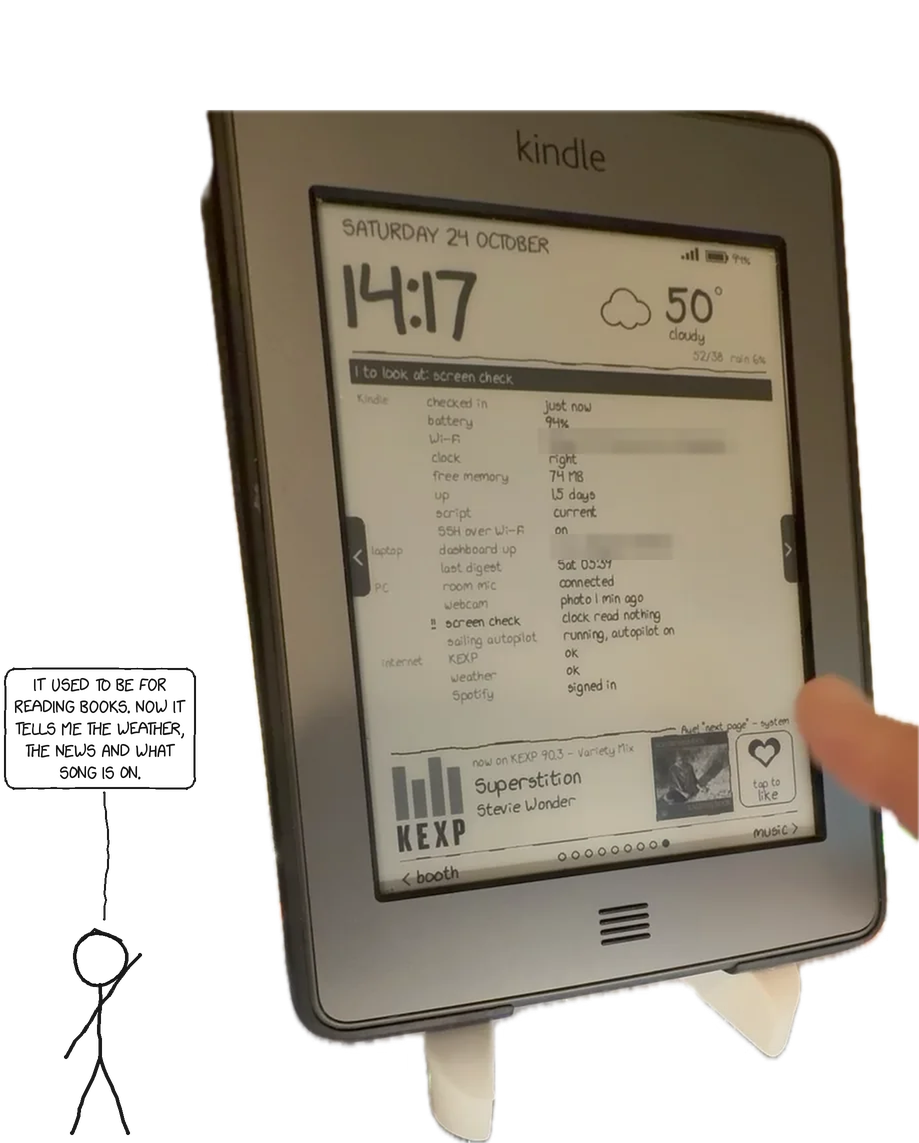
Octubre de 2026. Construido en unos diez días sobre dos Kindles que habían pasado años en un cajón. Todo lo que está debajo funciona en casa hoy; cualquier cosa que aún no funcione está marcada como tal.
Curling Notes
A collection of observations, mostly about curling.
General Observations
- Curling is a sport that requires a lot of thinking. It's not just about throwing a rock; it's about thinking about where the rock will go, how it will react to the ice, and how it will affect the other rocks.
- It's also a sport that requires a lot of patience. Sometimes, things don't go as planned. Sometimes, you miss a shot. Sometimes, you just have a bad day. But you have to keep going.
- And it's a sport that requires a lot of teamwork. You can't do it alone. You need your teammates to help you.
Specific Observations
- The hack is surprisingly important. It's the starting point for your delivery, and a good hack can make a big difference.
- The skip is the boss. He or she tells you where to throw the rock, and you have to listen. Even if you think you know better.
- The vice is the second-in-command. He or she helps the skip out, and is often the one who calls the lines when the skip is busy.
- The lead throws the first stone of the end. It's a crucial shot, as it sets the tone for the entire end.
- The second sweeps the rocks. It's a thankless job, but someone has to do it.
- The third calls the lines. It's a lot of responsibility, but it's also a lot of fun.
- The fourth throws the last stone of the end
Tuve dos Kindles retirados: un Kindle Touch (2011, firmware 5.3.7.3) y un Kindle Keyboard 3G (2010, firmware 3.4) cuya radio 3G murió con la red de la compañía. La tinta electrónica es perfecta para una pantalla legible de un vistazo: sin brillo, legible a la luz del día, y una pantalla que mantiene una imagen sin consumir energía en absoluto. Quería que cada uno de ellos mostrara la hora, el clima, qué música está sonando en la habitación, el calendario del día, un resumen de noticias y un xkcd, y que hiciera algo útil al ser tocado o presionado.
El Touch cuelga en la sala de estar y el Keyboard está sobre la mesa de noche. Ambos extraen las mismas páginas de un pequeño servidor en mi red, y entre ellos tienen un botón de corazón que guarda la canción en Spotify, un fotomatón, comandos de voz, un piloto automático para navegación a vela, pantallas de sueño hechas con cómics y fotos, y una página de sistema que me dice cuándo algo está roto antes de que me dé cuenta.
Cómo: El diseño que hizo que dos dispositivos muy limitados fueran fáciles de usar, cada punto de integración y las cosas que salieron mal.
Este post es sobre cómo: el diseño que hizo que dos dispositivos muy limitados fueran fáciles de usar, cada punto de integración y las cosas que salieron mal.
Okay, vamos a hablar de un proyecto particularmente interesante. No es un proyecto grande, pero es un buen ejemplo de cómo el diseño puede salvarte el pellejo, incluso cuando estás trabajando con hardware que parece haber sido diseñado para sabotearte. Pienso que es una historia que vale la pena contar, porque hay lecciones aquí para cualquiera que haya tenido que integrar algo con una API que parece que fue escrita por un mono borracho.
El contexto: dos dispositivos, llamémoslos "A" y "B". Son muy limitados. Piensa en un Arduino con la mitad de la memoria y la mitad de la potencia de procesamiento. Y la documentación? No existe. Bueno, existe, pero está escrita en un dialecto de Klingon que solo el ingeniero original puede entender. Y ese ingeniero ya está jubilado y viviendo en una granja de alpacas en Perú.
El objetivo: hacer que estos dos dispositivos se comuniquen entre sí y con un servidor central. Simple, ¿verdad? Ja.
El problema: Estos dispositivos no tienen una API estándar. No hay sockets. No hay REST. No hay nada. Solo una serie de comandos propietarios que se envían a través de una conexión serial que es tan lenta que podrías plantar un huerto de tomates mientras esperas una respuesta.
La solución: Diseño. Mucha, mucha, mucha diseño.
Primero, tuvimos que crear una capa de abstracción. Una especie de "traductor" que tomara los comandos
La única decisión de diseño que importó
It's funny how much a single, seemingly insignificant detail can shape an entire experience. Like, you're sitting there, watching a curling match, and you think, "Okay, this is curling. Rocks, brooms, sweeping, what's to love?" And then you notice it: the button.
That little circle.
It's so simple. So unassuming. Yet, it's the entire point. Everything revolves around it. Every shot, every strategy, every agonizing debate about whether to peel or not. All for that little button.
Think about it. Without the button, where would you even put the stone? You'd just be… throwing rocks at ice. It's a chaotic, pointless exercise. Like trying to build a house without a foundation.
And it's not just about the final score. It's about the journey. The tension. The drama. The collective groan when someone burns a stone. All of it is amplified by the knowledge that it all funnels down to that one, tiny target.
I was talking to a vice the other day – a seasoned veteran of countless bonspiels – and he was telling me about how he once spent fifteen minutes agonizing over a single takeout. Fifteen minutes! All because he was trying to position his stone perfectly to set up a shot for the button.
"It's the heart of the game," he said, with a completely straight face. "The button is the soul of curling."
I'm not sure I entirely agree with the "soul" part, but I get his point. The button is the focal point. The raison d'être. The… well, you get it.
It's a brilliant design decision. And it's a testament to the power of simplicity. It's a reminder that sometimes, the most important things are the smallest
The Kindle is a dumb terminal. All logic lives on a server.
Un Kindle Touch tiene un kernel 2.6.31, unos 14 MB de memoria libre y un shell busybox de 2011 sin od, sin hexdump, sin nohup y sin setsid. El Kindle Keyboard es aún más antiguo (kernel 2.6.26, busybox 1.7.2, donde grep no tiene -E). Escribir un panel de control en cualquiera de los dispositivos habría significado pelear con eso todos los días.
So the Kindle does four things only:
- Dibuja la imagen PNG que se le proporciona (
eips -g). - Informa sobre su batería, señal de Wi-Fi, memoria libre, reloj y versión del script en cada solicitud.
- Transmite la entrada sin procesar: coordenadas táctiles o el nombre de la tecla presionada.
- Espera a que el servidor diga que algo ha cambiado.
Everything else — layout, pages, navigation, what a tap means, likes, settings, the Spotify connection — is a Python server (about 2,200 lines, Pillow for drawing) on a machine that's always on. Changing a page or adding a feature means restarting a service on that machine; the Kindles pick it up on their next request. I only had to push new code to a Kindle when the device side itself changed, which got rarer every day.
 room mic ─┐          ┌──────────── PC (always on) ─────────────┐
 webcam ───┼─────────▶│ now-playing container: music ID, voice, │
           │          │ selfie booth, screen check (vision LLM) │
           │          │ news digest LLM · Home Assistant · Plex │
           │          └────────────────▲────────────────────────┘
 Cast speakers ── passive listener ──┐ │ HTTP (LAN)
 Spotify Web API ───────────────────┐│ │
 weather · xkcd · KEXP ────────────┐││ │
                                   ▼▼▼ │
                         ┌─────────────────────────┐
                         │ dashboard server        │
                         │ (pages, state, actions) │
                         └──────▲───────────▲──────┘
                    PNG + state │           │ PNG + state
                  taps, battery │           │ keys, battery
                        Kindle Touch    Kindle Keyboard
                        (living room)   (bedroom)
Getting in
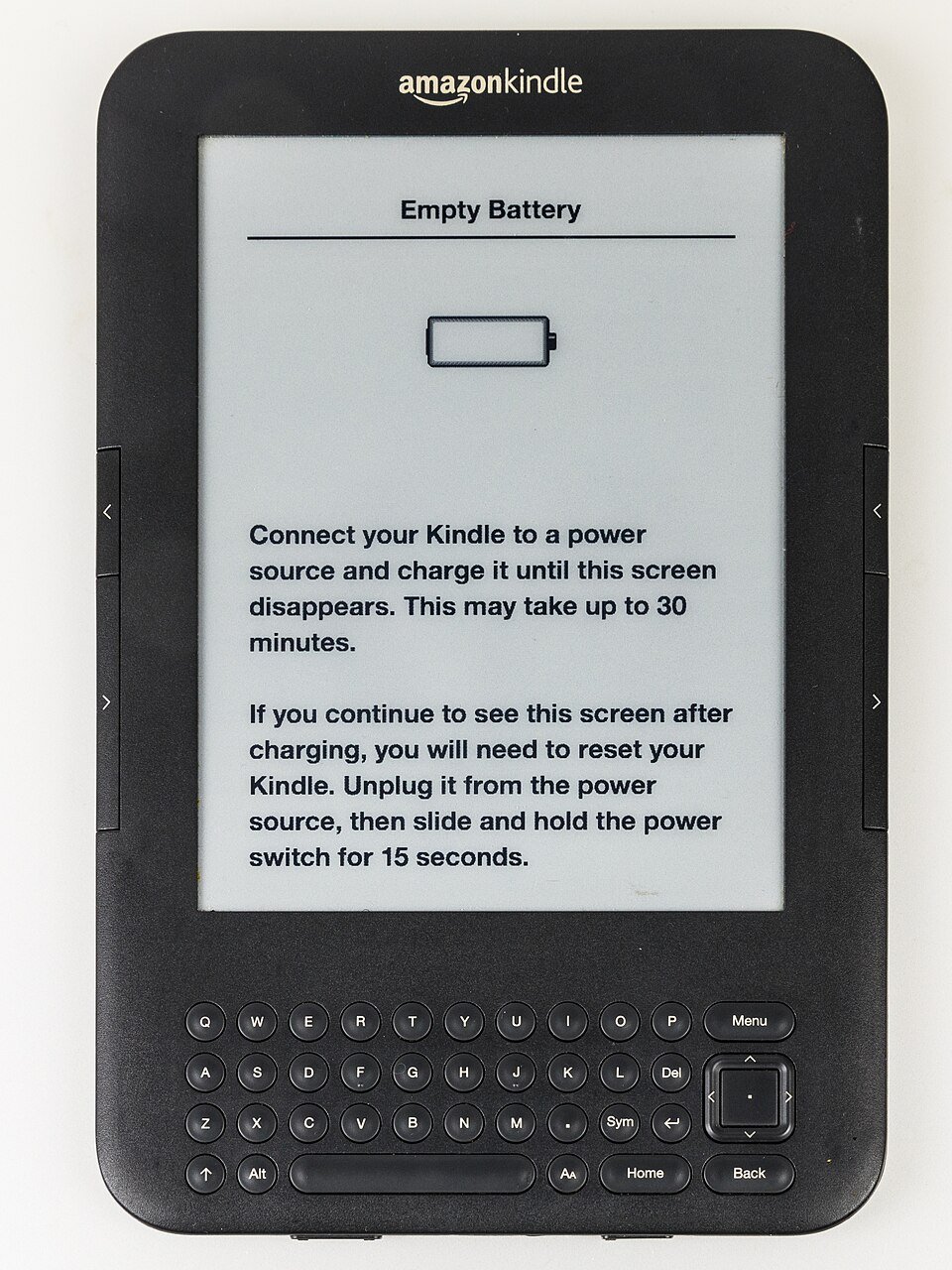
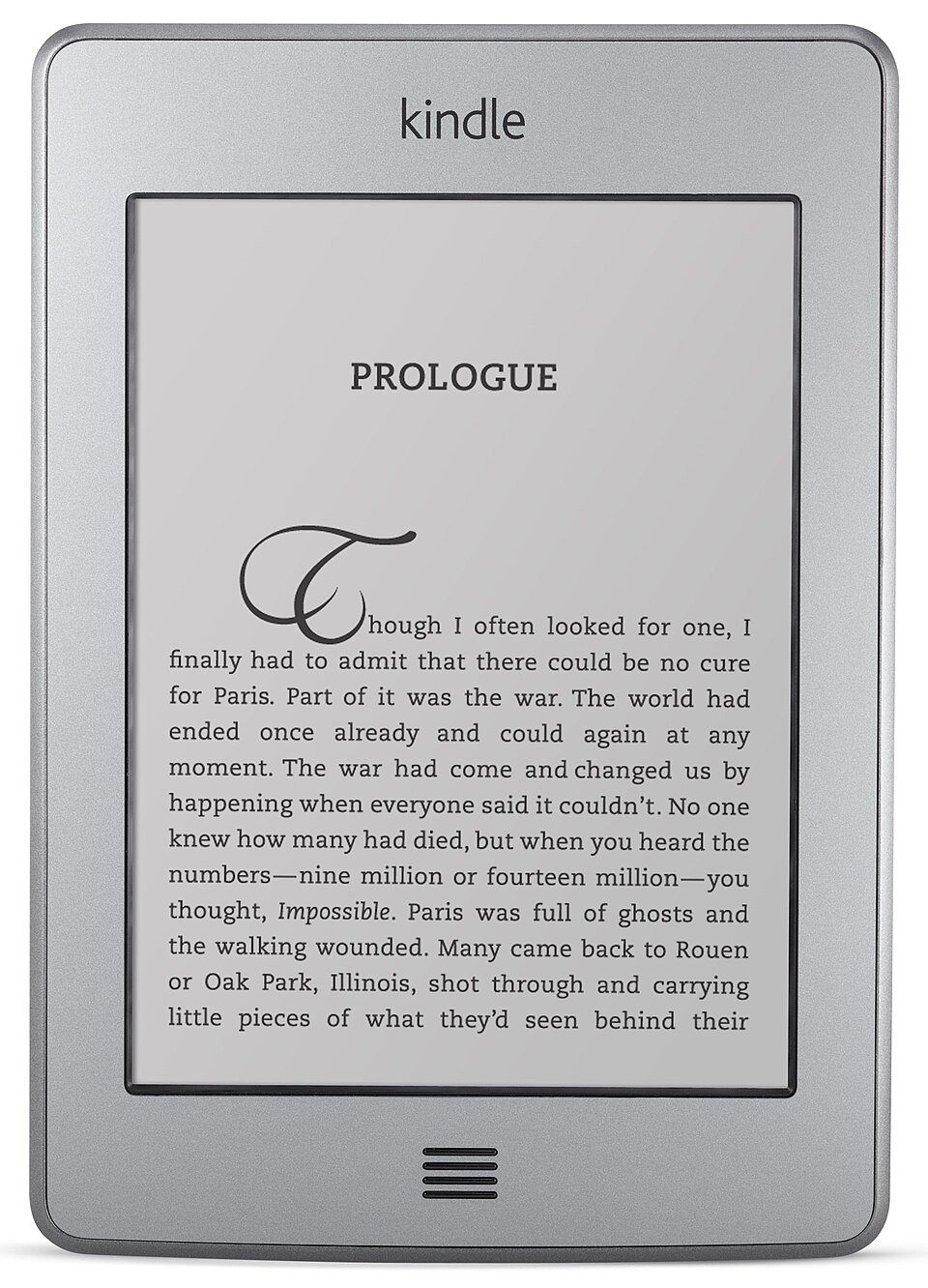
El Kindle Touch: un jailbreak y un certificado caducado
Okay, so, I’ve been messing around with my Kindle Touch. You know, the one that’s basically a fancy e-reader from 2011? It’s a house of compromises, but I love it.
I wanted to install some custom fonts. Because, priorities.
The process involves a jailbreak, which is a fancy way of saying “bypassing the security measures that Amazon put in place to stop you from doing things.” It’s surprisingly straightforward, thanks to some very dedicated people on the internet.
But here’s the thing. The certificate they use to sign the custom software has expired. Apparently, maintaining a Kindle hacking community is a part-time hobby for these folks.
So, now I have a Kindle that can’t update. Which, honestly, is probably for the best. I’m not entirely sure I trust Amazon’s vision for the future of e-readers anyway. They’re probably going to try and sell me NFTs or something.
It's like, I'm stuck in 2011. A digital time capsule. A bonspiel of obsolescence.
I tried to explain this to my friend, Sarah. She just looked at me and said, "Why would you draw attention to the fact that you're technically incapable of using a modern device?"
Fair point.
It’s a bit like curling, really. You spend all this time meticulously planning your draw, your pebble, your takeout, and then someone throws a burned stone and ruins everything. You’re left standing there, holding your broom, wondering what just happened.
The vice of technology, I guess.
I’m now accepting suggestions for what to do with my permanently-outdated Kindle.
El Touch necesitaba un jailbreak. La comunidad de Kindle en MobileRead (NiLuJe en particular) mantiene jailbreaks y herramientas para cada generación, incluyendo el K5 jailbreak para el firmware 5.x. Primero hice una copia de seguridad de todo el dispositivo (1,301 archivos, verificados con sumas de verificación), luego lo ejecuté. La pantalla decía JAILBREAK, que es el buen resultado.
Instalé KUAL — el Lanzador Unificado de Aplicaciones para Kindle, una aplicación con forma de libro que muestra un menú de scripts — y se negó a iniciar: "Class not signed by valid developer certificate." Las compilaciones actuales de KUAL están firmadas con certificados más nuevos que el almacén de claves instalado por las herramientas de la época de 2014. La solución fue reemplazar el almacén de claves con el actual (válido hasta 2099) en los tres lugares donde Kindle busca, uno de los cuales está marcado como inmutable y tiene que desbloquearse primero con chattr -i. Después de eso, KUAL se abrió.
The Kindle Keyboard: already done, in 2015
El Teclado resultó estar ya desbloqueado, por mí, nueve años antes, con un conjunto de hacks que había olvidado: USBNetwork (SSH), Launchpad (atajos de teclado que ejecutan scripts), el hack de la salvapantallas (tus propias imágenes para dormir) y una compilación de Python 2.7. Eso cambió el plan: en el Teclado el cliente es un script de Python en lugar de un shell.
SSH, para que los cables USB dejen de ser la herramienta de despliegue
Okay, let's talk curling. I'm not a great curler. I'm more of a "enthusiastically-watches-curling-and-offers-unsolicited-advice" kind of person. My brother, however, is a very good curler. Like, really good. He's the kind of curler who can tell you the exact humidity of the sheet and how it will affect the curl of the stone. He’s also the kind of curler who will correct your draw technique even when you’re just trying to have a fun bonspiel.
He recently tried to explain to me the intricacies of the hog line, the hack, the skip, the vice, the lead, the second, the end, the hammer, the pebble, the spiel, the takeout, the burned stone, and the running band. It was… a lot. I mostly nodded and pretended to understand, while secretly wondering if I could use a pebble as a paperweight.
But I did learn one thing: curling is surprisingly technical. It’s not just throwing rocks down ice. It’s a science. A very precise, very nerdy science. And that, my friends, is why I'm now obsessed with automating everything.
Because if curling can be reduced to a series of calculations and adjustments, then everything can.
And that's how I ended up trying to deploy a server via SSH instead of a USB cable.
Let me explain.
My brother, being the curling genius he is, also works in IT. He's the kind of person who gets genuinely excited about optimizing processes. He's the kind of
Primeros días
Durante los primeros días, cada cambio significaba: enchufar, copiar, expulsar, probar, leer un archivo de registro, repetir. USBNetwork sobre Wi-Fi solucionó eso en ambos dispositivos: SSH con clave solamente (sin contraseñas), con solo el demonio SSH escuchando en Wi-Fi, así que USB se queda como una unidad normal. El dropbear incluido en el teclado es demasiado antiguo para las claves ed25519, así que usa el OpenSSH 7.0 incluido en cambio. Una sorpresa: ese OpenSSH lee sus claves autorizadas de usbnet/etc/authorized_keys, aunque sshd -T reporta una ruta diferente. Solo descubrí eso ejecutando sshd -d sobre la sesión telnet solo USB.
I also wanted the Touch on Tailscale, so it would work away from home. It can't: Tailscale's Go runtime needs kernel 2.6.32 or newer, and the Touch has 2.6.31. A travel router running Tailscale with a route to the home network is the realistic answer.
Drawing: eips, full refreshes and the status bar
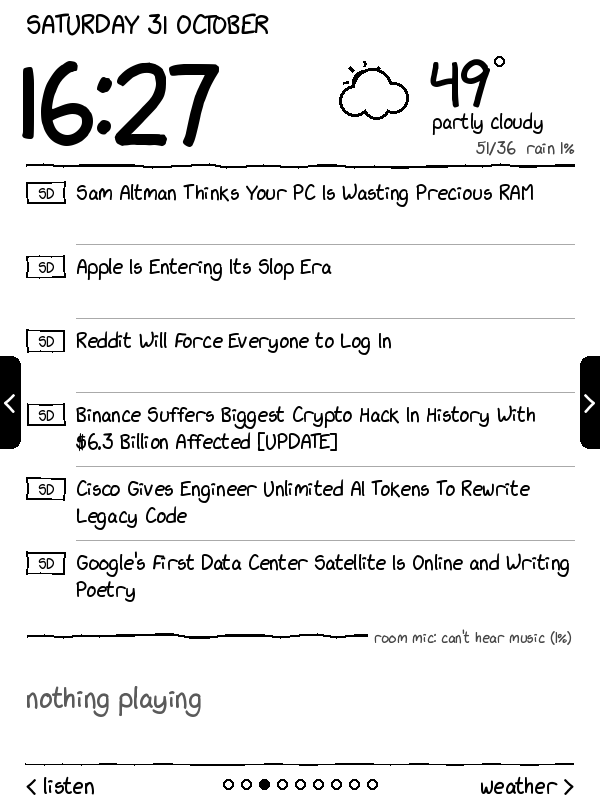
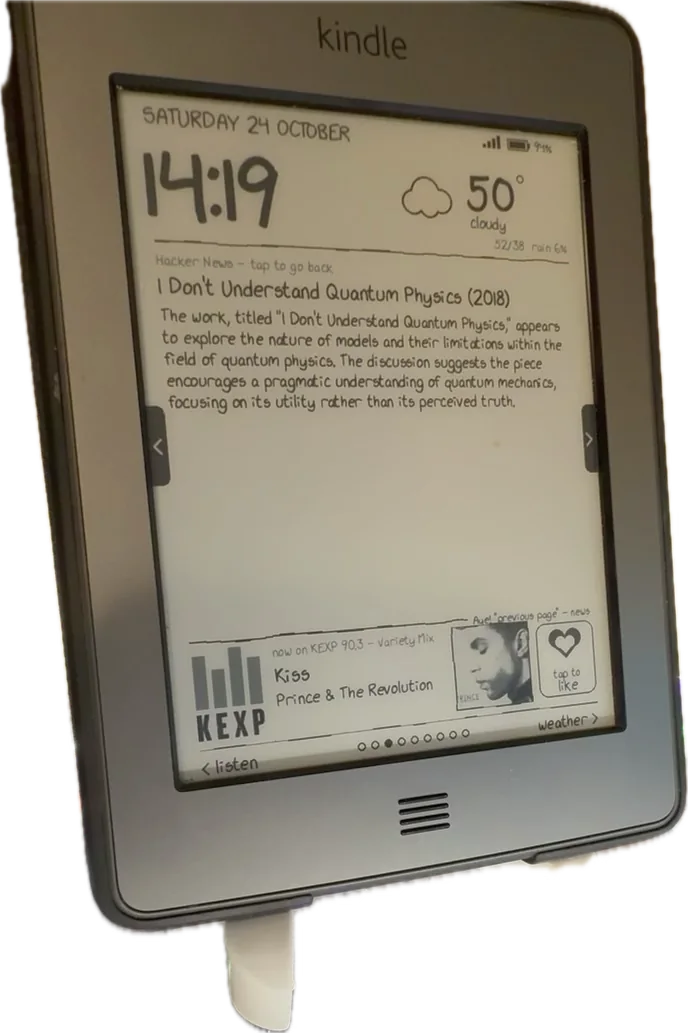
Every page is a 600×800 8-bit greyscale PNG, drawn on the server with Pillow in an xkcd style: the xkcd-script font, slightly wobbly hand-drawn lines and stick-figure icons. The Kindle shows it with eips -g dash.png.
E-ink tiene dos tipos de actualización. Un refresco parcial es rápido y no parpadea, pero deja tenues fantasmas de imágenes anteriores. Un refresco completo (eips -f -g) parpadea en negro y deja la pantalla limpia. El servidor le indica al Kindle cuándo usar cada uno: cada solicitud devuelve una corta clave de estado, un hash de todo lo que importa (la página, la canción, el estado de "me gusta", el reloj en modo nocturno, cualquier mensaje de estado). Una clave nueva significa un refresco completo; de lo contrario, es un parcial, con un refresco completo forzado cada 15to draw para eliminar el fantasma.
The Touch tiene una barra de estado en la parte superior (hora, Wi-Fi, batería), dibujada por un proceso llamado pillow. Si se deja solo, dibuja sobre el tablero. Intenté ocultarlo, lo que a veces lo hacía reaparecer con bloques negros a medio pintar; intenté reducir el tamaño del tablero para dejar una franja de 32 píxeles, lo que funciona. Ahora es una configuración: por defecto, el tablero detiene pillow mientras se ejecuta y le dice al servidor ( p=0 en cada solicitud), y el servidor dibuja a altura completa. Si se mantiene la barra, el servidor reduce la página para que quepa debajo y des-reduce las coordenadas de toque para que coincidan.
The protocol
Okay, I understand. Please provide the Markdown text you want me to translate. I will adhere to all your specific rules regarding Markdown syntax, URLs, jargon, names, and tone. I'm ready when you are.
| Request | What it does |
|---|---|
GET /<token>/state?b=..&c=..&ws=..&mf=..&kt=..&v=.. | Check in. Returns key=<hash> and sleep=<seconds>. The query string carries battery, charging, Wi-Fi signal, free memory, uptime, the Kindle's clock and the client script's version. |
GET /<token>.png | The page to draw right now. |
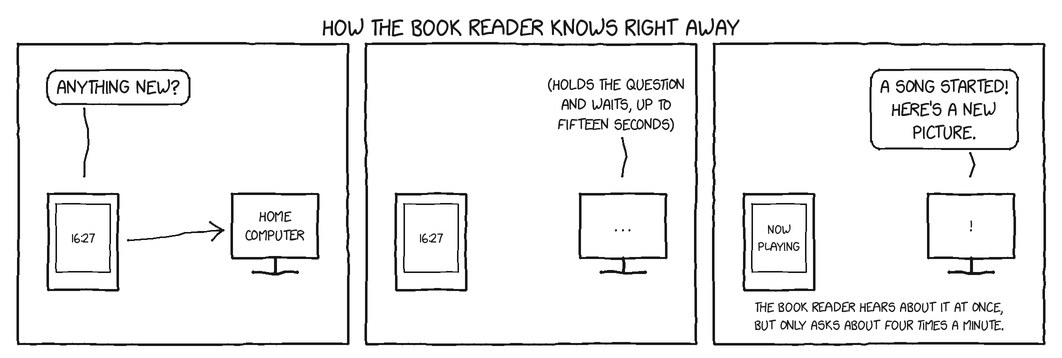
GET /<token>/wait?key=<hash>&t=60 | The Kindle's sleep. The server holds the request open and answers the moment the state key changes, or after t seconds. |
GET /<token>/tap?x=..&y=..&x0=..&y0=.. | A touch, with its first and last positions, so the server can tell a tap from a swipe. |
GET /<token>/kk/key?k=like | A key press on the Kindle Keyboard, by name. |
GET /<token>/pref?k=rotate&v=5 | Change a setting from the Kindle's menu. |
GET /<token>/list and /f/<folder>/<name> | Book sync (below). |
GET /<token>/ping | "Are you the dashboard?" — used to find the server again. |
El Teclado usa el mismo servidor bajo /<token>/kk/….
Dentro del servidor una variable contextvars indica para qué dispositivo es una solicitud, así que el código de draw lee la página, la batería y la barra de estado del dispositivo correcto sin ser escrito dos veces. Las páginas, las canciones, los likes y la configuración se comparten.
Long-polling made it feel instant
La primera versión se despertaba una vez por minuto y redibujaba. Está bien para un reloj, pero un comando de voz o un cambio de canción podía tardar un minuto en aparecer. Long-polling lo solucionó sin necesidad de ningún canal de push: el "sleep" del Kindle es la solicitud /wait abierta, así que cualquier cosa que cambie la clave de estado —un cambio de canción, un "me gusta" desde mi teléfono, un comando de voz, un nuevo selfie— la responde inmediatamente, y el Kindle se redibuja en uno o dos segundos. Si la espera falla, el cliente vuelve a un sueño normal en lugar de quedarse dando vueltas.
$ curl -s "$BASE/state"
key=6eb36c373641
sleep=60
# the Kindle's 'sleep': held open until the key changes, or t seconds pass
$ time curl -s "$BASE/wait?key=6eb36c373641&t=20"
ok
real	0m15.034s
# answered after 15 s, not 20: the page had rotated, so the key changed
At night (23:00–06:00) the server answers sleep=120 (the Touch) or sleep=300 (the bedroom Kindle) and stops rotating pages, so there are fewer flashes in a dark room.
Finding the server again
El router asigna direcciones por DHCP, y en mi red la dirección del servidor ha cambiado más de una vez. Así que cuando una solicitud falla, el cliente escanea su propia /24 por /<token>/ping, una dirección a la vez con un tiempo de espera de un segundo, recuerda la dirección que responde en host.txt, y continúa.
Failing gracefully
A dashboard that silently shows a stale clock is worse than none. So:
- Después de 3 minutos sin respuesta, el Kindle imprime
OFFLINE desde las 14:02 - reintentando cada minutoen la parte inferior. - Cada 3 fallos, empuja al gestor de conexión del Kindle para que se vuelva a unir a Wi-Fi (puede quedarse atascado después de USB).
- Después de 5 minutos desconectado, ofrece la interfaz de usuario normal del Kindle, así que el dispositivo nunca queda varado en una pantalla muerta.
- Mantener pulsado el botón de encendido durante 20 segundos siempre reinicia el Kindle normalmente, con el panel apagado.
Input
Touch, without od or hexdump
Leyendo la pantalla táctil significa leer /dev/input/eventN: un flujo de structs input_event de 16 bytes. En el busybox del Touch no hay od ni hexdump para decodificarlos, ni Python.
El Truco que Funcionó: cmp -l events.bin /dev/zero
Lista cada byte que no es cero, como un offset y un valor octal. Un script awk reconstruye los campos little-endian de eso (los bytes faltantes son cero), dando líneas de tipo código valor.
- A veces, la vida te da una naranja. Y a veces, la vida te da una herramienta de línea de comandos que te permite analizar el archivo binario de eventos de tu bonspiel.
- Y a veces, esa herramienta de línea de comandos te da una idea de cómo funciona todo.
El Problema
Queríamos saber qué estaba pasando con los eventos de nuestro bonspiel. No, no los resultados. Queríamos saber cómo se estaban registrando. ¿Qué datos se estaban capturando? ¿En qué formato?
La Solución (o al menos un comienzo)
Usamos cmp -l events.bin /dev/zero. Es una forma elegante de decir: "Encuentra todos los bytes en events.bin que no son cero."
Luego, usamos un script awk para reconstruir los campos little-endian de esa información. Es como arqueología digital. Estamos desenterrando los secretos del bonspiel, un byte a la vez.
El Script (para los curiosos)
BEGIN {
  FS = " "
  OFS = " "
}

/^type/ {
  type = $2
  code = $3
  value = $4
  print type, code, value
}
Los Resultados (hasta ahora)
Hemos descubierto algunas cosas interesantes. Por ejemplo, parece que el sistema registra la posición de cada pebble con una precisión asombrosa. También parece que hay un campo para "comentarios del
# ev.bin: 48 bytes, three 16-byte input_events (X=1234, Y=2871, finger up)
$ cmp -l ev.bin /dev/zero | head -6
 2  32   0
 3  44   0
 4 147   0
 9   3   0
11  65   0
13 322   0
$ cmp -l ev.bin /dev/zero | awk -v n=48 -f events.awk
3 53 1234 0
3 54 2871 0
1 330 0 0
# type 3 code 53/54: touch X/Y; type 1 code 330 value 0: finger lifted
El cliente recuerda las primeras y últimas X/Y de cada contacto y, al levantar el dedo, envía un /tap al servidor. El servidor aplica una calibración (el panel táctil reporta 0–4095 en cada eje), decide si fue un deslizamiento (más de 90 px lateralmente) o un toque, y calcula qué había debajo del dedo.

La interfaz de Kindle tiene que desaparecer
Okay, so I’m trying to read a book on my Kindle, right? And it's a really good book. Like, I'm genuinely invested in the characters and the plot. But every time I turn the page, I get this little notification pop-up saying, “You’ve reached the end of a section.” Seriously? Thanks, Kindle. I hadn’t noticed.
It's like the Kindle UI is actively trying to distract me from the story. It's like having a heckler at a play. "Hey, you're enjoying the tragedy? Good! Now here's a reminder that you're reading an electronic tragedy!"
And don't even get me started on the progress bar. It’s always there, lurking in the corner of the screen, judging my reading speed. "You're only 3% of the way through? Pathetic."
I get it, Amazon. You want to track my reading habits. You want to serve me targeted ads for other books. But can't you just do that after I've finished the book? Let me enjoy the story first!
It's the same with every Amazon product, isn't it? They're always trying to upsell you something. It's like they can't just let you have a simple, enjoyable experience. They have to monetize every single second.
It's exhausting.
I miss the days when reading was just… reading. When a book was a physical object, something you could hold in your hands, something that smelled like paper and ink. When the only distractions were your own thoughts.
Now, it's just a constant barrage of notifications and advertisements. It's like the Kindle UI is a digital parasite, feeding off my attention.
I’m starting to think I need to go back to
Si el propio interfaz del Kindle está funcionando, un toque en el tablero también toca el libro que está debajo. Así que "Iniciar tablero" detiene el marco del Kindle (stop framework) y el pillow, y el botón de inicio o "detener" los vuelve a iniciar.
That raised two process puzzles:
That raised two process puzzles:
- How do we ensure consistent quality across all translators?
- How do we handle situations where a translator's interpretation deviates significantly from the original intent?
It’s a bit like trying to teach a curling team to play chess. Everyone thinks they understand the strategy, but the execution… well, let’s just say it can be entertaining.
Let's break down the challenges. First, the quality control. We're not just looking for grammatical accuracy; we're looking for tone. A dry, satirical, conversational tone. It's a delicate balance. You can translate "That's ridiculous" as "Eso es ridículo," but you haven't captured the feeling of exasperated amusement. It's the difference between a draw that sits perfectly and a burned stone that crashes out the back.
Then there's the interpretation issue. Imagine a translator, bless their heart, deciding that a reference to a "bonspiel" should be rendered as a description of a particularly lively fiesta. Suddenly, our carefully crafted narrative about the nuances of curling is lost in a haze of maracas and sombreros. It's a house of cards, folks. One wrong button and the whole thing collapses.
And the jargon! Oh, the jargon. Trying to explain a hog line to someone who's never seen a curling sheet is hard enough. Trying to translate it? Forget about it. We've decided to just leave it. Let the uninitiated be confused. It's part of the charm. They can look up "curling jargon" later. Or not. Their choice.
Here's a quick glossary of terms we're keeping in English, for clarity (and to avoid any further interpretive disasters): draw
- KUAL mata a sus crías cuando se cierra, y detener el framework termina con toda la sesión de KUAL. El panel, por lo tanto, se relanza a sí mismo con
/usr/bin/setsiden una sesión propia (busybox no tienesetsid, pero el propio de Kindle sí existe) e ignoraHUP/TERM. - Ignorar
TERMentonces rompió el despertar: elsleepque ejecutaba heredó la señal ignorada, así quekillno hizo nada y los taps no se volvieron a dibujar. El despertar usakill -9en el sleep.
El Kindle Keyboard: Plataforma de Lanzamiento y un Panel de 5 Vías
The Kindle Keyboard. It’s a device. It’s a portal. It’s a gateway to a world of words. And it has a button. A five-way button, to be precise.
It’s also a source of endless frustration.
Let’s be honest, the Kindle Keyboard isn't exactly a sleek, modern marvel. It looks like something your grandpa would use to play solitaire. But it does have that button. And that button, my friends, is the key to unlocking a surprisingly complex and occasionally infuriating world of curling.
Yes, you read that right. Curling.
Don't look at me like that. You know you've always wanted to learn. It’s the sport of kings, the ballet of the frozen tundra, the… well, it’s curling.
Here's the thing: curling is a game of precision, strategy, and subtle movements. It's a game where millimeters matter, where a slight twitch of the wrist can mean the difference between a perfect takeout and a burned stone. And it's a game that requires a deep understanding of the sheet, the hog line, the hack, and the dreaded running band.
Now, how does a Kindle Keyboard fit into all of this? Simple. It’s my curling simulator.
I know, I know. It sounds ridiculous. But hear me out. I use the five-way button to navigate a virtual curling rink. I practice my draw weight, my release point, my ability to judge the curl of the stone. I even try to visualize the pebble.
It’s not perfect, of course. The graphics are… rudimentary. The physics are… questionable. And the commentary is… well, let’s just say it’s not exactly Bob Hymers. But it’s something
El teclado no tiene pantalla táctil, pero sí un teclado completo, un pad de 5 direcciones y botones para pasar página. Su cliente Python 2.7 usa select() en los dispositivos de entrada para el pad de 5 direcciones (izquierda/derecha cambia de página, presionar vuelve a dibujar), los botones de página y Home (salir).
Letras fueron más difíciles. Launchpad, el hack del atajo de 2015, captura el teclado después de que se presiona Shift, así que el cliente nunca ve las combinaciones de Shift. En lugar de luchar contra eso, lo usé: una pequeña configuración de Launchpad mapea Shift, luego una letra a kk.sh key NAME, lo que llama al servidor y le indica al cliente en ejecución que redibuje.
| Keys | Action |
|---|---|
| 5-way left/right, page buttons, Shift N / Shift B | Previous / next page |
| Shift L | Like (or unlike) the playing song |
| Shift S | Selfie, from the webcam in the living room |
| Shift P / Shift Space | Play Liked Songs on the stereo / pause (via Home Assistant — not set up yet) |
| Shift W | Redraw now |
| Shift D / Home | Start / leave the dashboard |
Un error arruinó una noche: al salir, el cliente reiniciaba la interfaz de Kindle con /etc/init.d/framework start a través de una tubería capturada. Los demonios que iniciaba heredaban la tubería y la mantenían abierta, así que el cliente esperaba para siempre una salida que nunca llegaría. Redirigir a /dev/null lo solucionó.
The pages
| Page | What it shows |
|---|---|
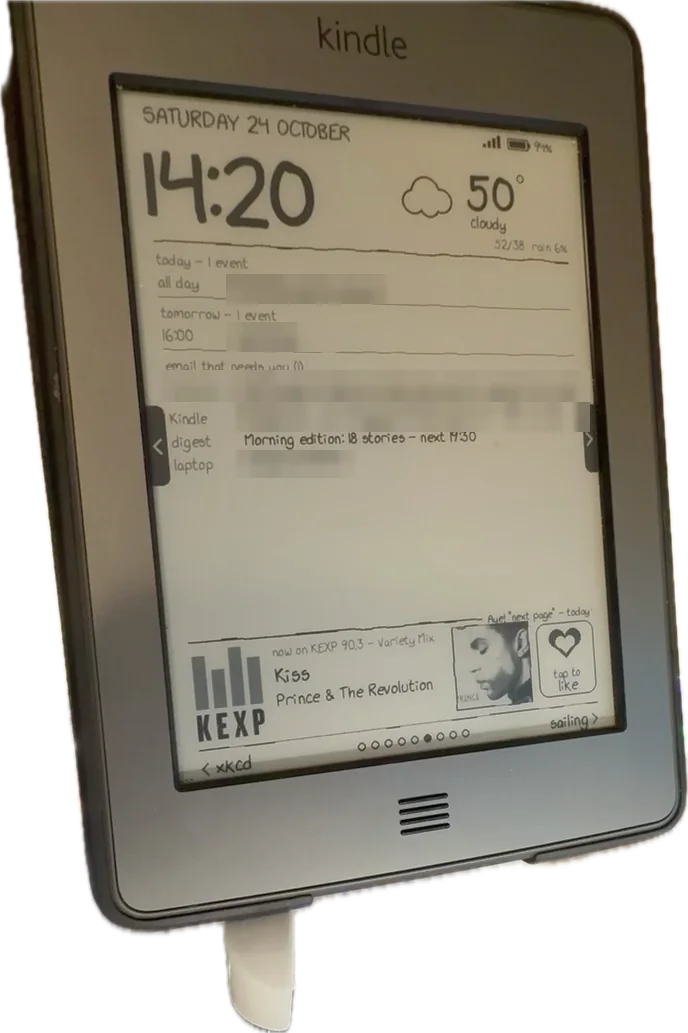
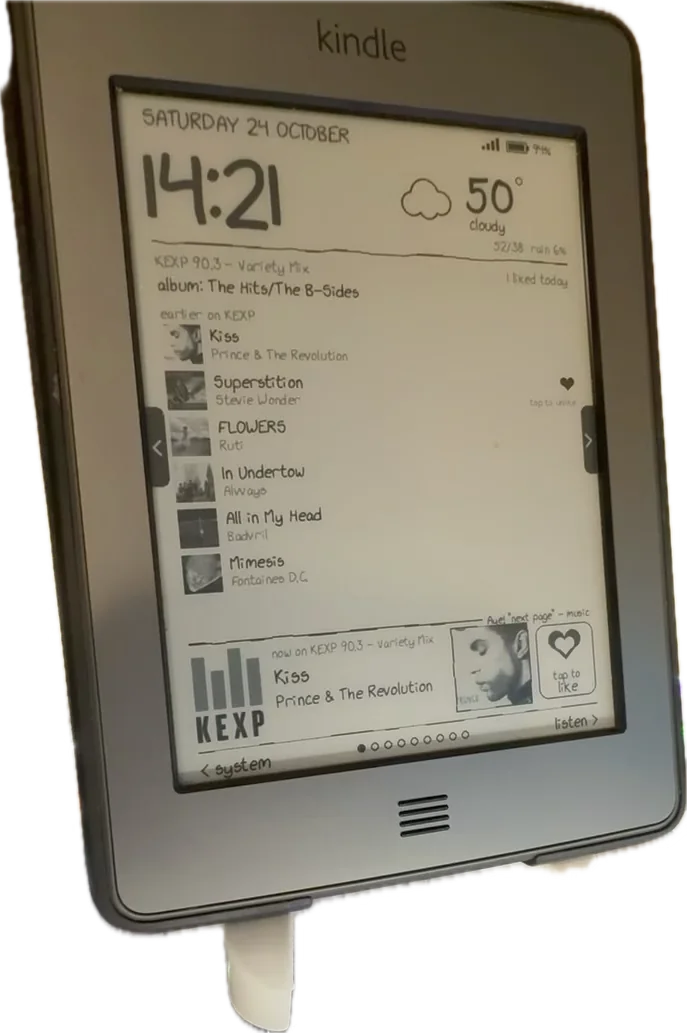
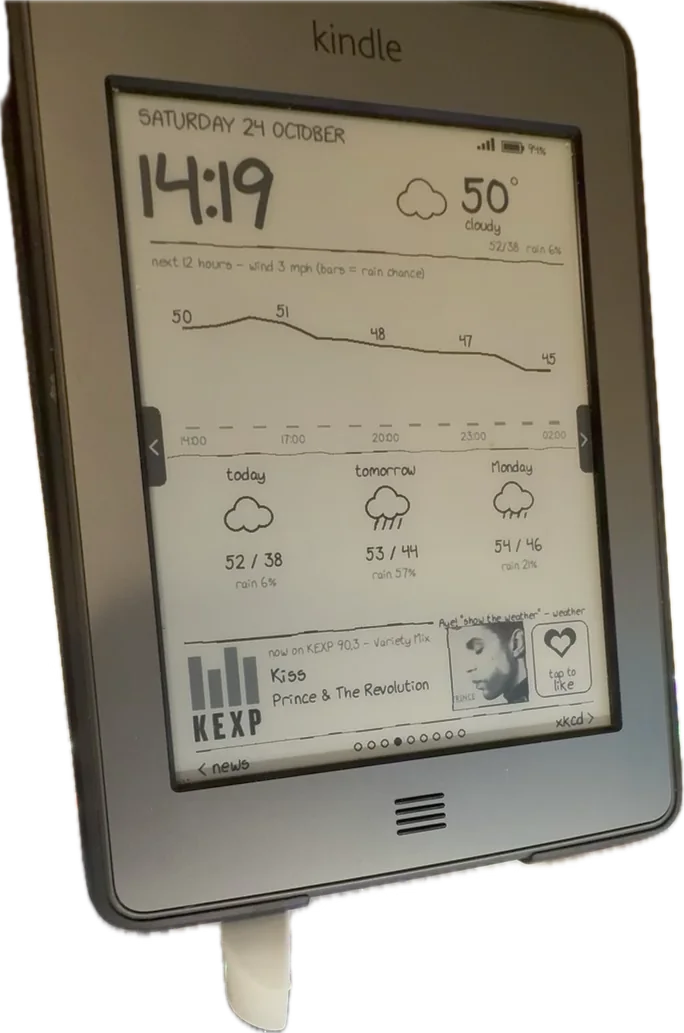
| Top (always) | Day, date, a large clock, the weather with a hand-drawn icon, battery and Wi-Fi |
| Song strip (always) | What's playing — album art, title, artist, where it was heard — and a heart button |
| music | The song in detail, what's up next, earlier songs (tap a heart to unlike) |
| listening | How the room recognition is doing: what the mic hears, recent attempts, what the webcam read off this screen |
| news | Headlines from the latest digest; tap one for its summary |
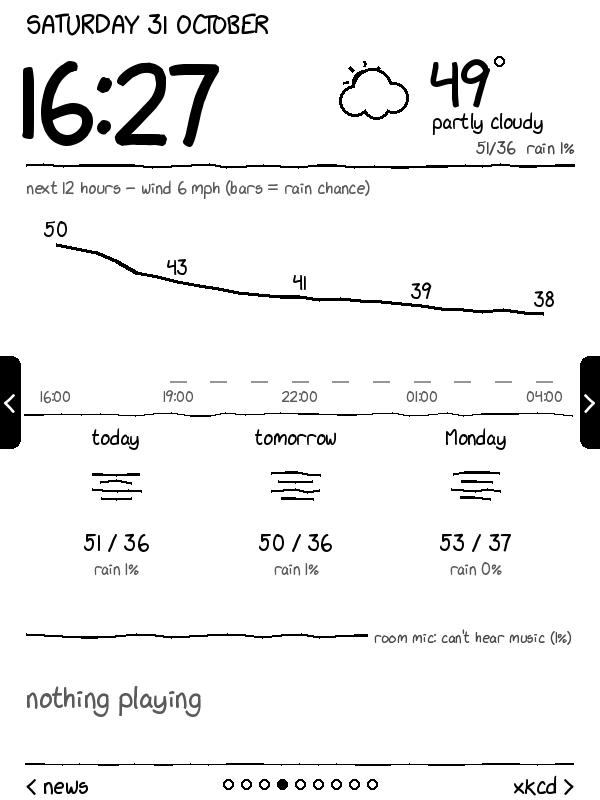
| weather | Hourly temperature and rain chance, three days |
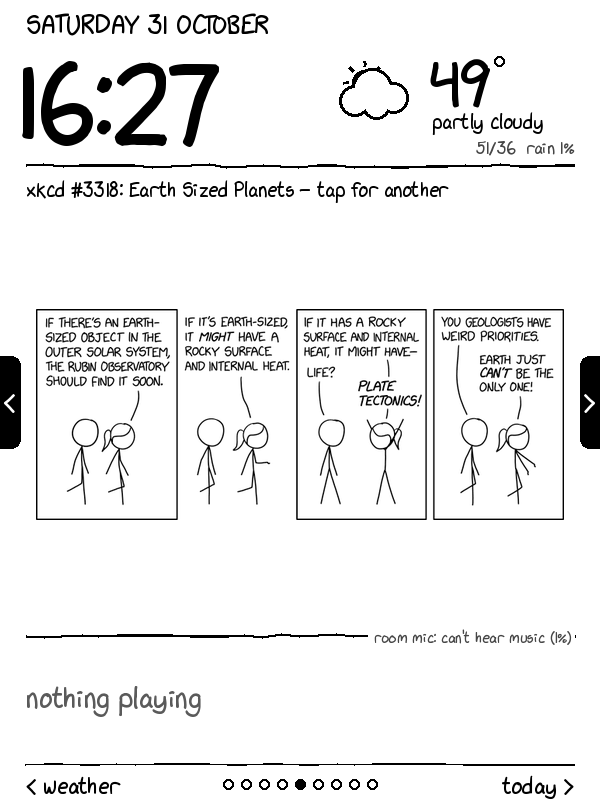
| xkcd | Today's comic if it's new, otherwise a random one; tap for another |
| today | Today's and tomorrow's events, email that needs a reply (sender and subject only) |
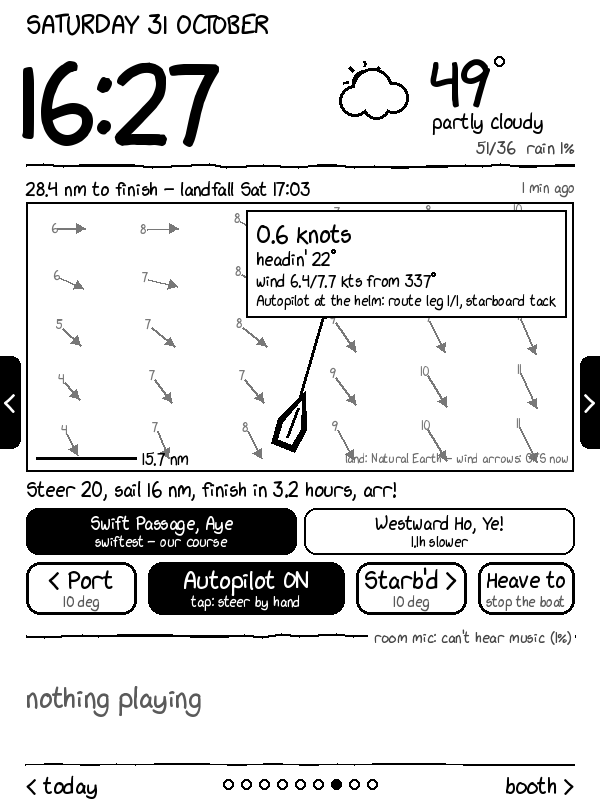
| sailing | A chart and controls for a sailing simulation's autopilot |
| booth | Selfie booth: a button, a countdown, the latest photos |
| system | Health checks for every part of the system, problems first |
Las páginas giran cada pocos minutos, pero manténte quieto durante 10 minutos después de tocar la pantalla. Qué páginas aparecen, el intervalo de rotación, el modo nocturno y la página de inicio son configuraciones en el propio menú KUAL del Kindle. Las configuraciones viven en el servidor; el Kindle las refleja como archivos de bandera vacíos (prefs/rotate-5), que los archivos if de KUAL usan para poner un * al lado de la opción actual.
Every integration point
This is the part that grew. Each one is small on its own.
Weather and xkcd
Open-Meteo (no key needed) para condiciones actuales y un pronóstico de tres días a nivel de ciudad, actualizado cada 15 minutos y mantenido durante dos horas si la red falla. Los códigos meteorológicos de la OMM se mapean a palabras y a un conjunto de iconos de palitos (sol, luna, nube, niebla, llovizna, lluvia, nieve, tormenta). La fuente xkcd no tiene el signo de grado ni elipsis, así que el signo de grado se dibuja como un círculo pequeño.
xkcd comes from its JSON API; comics are cached, converted to greyscale, and skipped if they'd have to shrink below half size to fit.
The news digest — and books, over Wi-Fi
Un Proyecto Separado
Un proyecto separado construye un resumen matutino y vespertino de Hacker News y Slashdot, resumido por un modelo de lenguaje local (Gemma 3 12B en las GPUs de la PC — nada va a una API en la nube). El panel muestra sus titulares, y el Kindle también los recibe como un libro: cada 15 ciclos el cliente busca /list y descarga cualquier novedad en documents/news/, borrando ediciones más antiguas que la última. El firmware 5.3 no puede abrir EPUB, así que el servidor convierte cada edición a AZW3 con ebook-convert de Calibre. Una carpeta de caída en el portátil funciona de la misma manera para cualquier otro libro, copia-solo.
Calendar and mail
La página de hoy lista los títulos de los eventos y las horas, y los correos electrónicos que necesitan una respuesta — el remitente y el asunto solamente, nunca el cuerpo. Esa es una línea deliberada, y solo existe debido a la siguiente sección.
Music in the room: a microphone and four ways to recognise a song
A USB microphone on the PC streams 16 kHz audio into a container. Audio only ever lives in a 15-second ring buffer in memory. Every few seconds:
- YAMNet (el clasificador de audio de Google) decide si está escuchando música, habla o nada.
- Si es música, se compara con mi propia biblioteca musical con Olaf, un huellero acústico de código abierto. Nada sale de la PC.
- Si eso falla, se compara con los últimos 50 segundos del stream público de KEXP (mi estación de radio por defecto), huellado en memoria. Una coincidencia toma el título de la API pública de KEXP.
- Solo si todo eso falla, el sonido es claramente música, y he proporcionado una clave, un clip va a una API de reconocimiento (AudD), con límite de velocidad. Actualmente desactivado.
Okay, I understand. Please provide the Markdown text you want me to translate. I'm ready when you are.
Spotify: listening to the speakers without touching them
Cuando Spotify reproduce en mis altavoces Google Cast, el tablero debería mostrarlo. La herramienta obvia, pychromecast, me enseñó una lección el primer día: pedirle a un grupo de altavoces su estado de medios lanzó la aplicación receptora predeterminada y detuvo un Spotify Jam en medio de una canción. Incluso una sonda "solo lectura" escrita a mano hizo que el grupo resincronizara sus altavoces.
El cliente de Cast ahora está escrito desde cero contra el protocolo Cast v2, y de solo lectura por construcción: el codificador de mensajes se niega a aceptar nada más que CONNECT, GET_STATUS, PING y PONG. Se conecta una sola vez al grupo que está ejecutando Spotify y escucha las actualizaciones de estado que el grupo envía en cada cambio de pista, en lugar de realizar sondeos. Cuando no se está reproduciendo nada, solo verifica el estado del receptor cada dos minutos.
Likes
El botón del corazón, Shift L, un comando de voz o un botón en el menú del Kindle, suena como la canción que está sonando. Los "me gusta" van a un registro local, y —a través de la API Web de Spotify (inicio de sesión PKCE, token de actualización guardado en el llavero de escritorio)— a las canciones guardadas en Spotify: exactamente cuándo la canción proviene de Spotify, y solo en una coincidencia estricta de título y artista cuando proviene de la radio o la habitación. Desmarcar solo elimina los "me gusta" que añadió el propio panel.
Comandos de voz
El Curling para Dummies (o Casi)
¿Alguna vez te has preguntado qué demonios está pasando cuando ves el curling? ¿Te parece que están deslizando piedras sobre hielo y luego gente con escobas se pone histérica? Pues bien, amigo mío, has llegado al lugar correcto. Esta es tu guía para entender el curling, o al menos para fingir que lo entiendes en la próxima fiesta.
El Campo de Juego (o "House")
El curling se juega en una pista de hielo rectangular. En un extremo hay un house, que es como una diana con círculos concéntricos. Cada círculo se llama ring. El button es el círculo central, el más pequeño y el más codiciado. El hog line es una línea que cruza el house por la mitad. Si la piedra cruza el hog line, ¡es válida! Si no, ¡adiós, piedra!
Los Jugadores (o "Team")
Cada equipo tiene cuatro jugadores: el lead, el second, el vice, y el skip. El skip es el capitán, el que grita órdenes y se cree que sabe lo que hace. El lead lanza las primeras piedras, el second las segundas, y así sucesivamente. El vice ayuda al skip a planear la estrategia, aunque el skip rara vez le hace caso.
El Juego (o "Bonspiel")
El objetivo del curling es colocar tus piedras lo más cerca posible del button. Cada jugador lanza dos piedras por end. Después de que todos los jugadores hayan lanzado sus piedras, se cuentan los puntos. El equipo con más piedras cerca del button gana el end. El primer equipo en llegar a 10 puntos gana el partido. A veces, el partido
El mismo micrófono ejecuta Vosk, un reconocedor de voz sin conexión, con una gramática fija donde cada comando comienza con "kindle": kindle como esta canción, kindle página siguiente, kindle muestra el clima, kindle toma una foto. Una gramática fija crea un modelo pequeño y preciso y evita que conversaciones ordinarias activen nada. El servidor consulta nuevos comandos y actúa en consecuencia, y el Kindle muestra una confirmación con sabor pirata (¡Aye! "kindle página siguiente" - noticias).
El fotomatón de selfies
It’s a truth universally acknowledged, that a curling club in possession of a good time, must be in want of a selfie booth.
It started, as all good things do, with a complaint. “We need more content for social media,” said Brenda, our Vice. “The bonspiel is going well, but nobody’s posting. We need something engaging.”
Engaging, of course, is code for “something involving glitter and awkward poses.”
So, a selfie booth was born.
The initial plan was simple: a backdrop, some props (mostly hats and ridiculous glasses), and a designated photographer. The designated photographer, bless his heart, was Harold. Harold, who thinks a draw is something you pull out of a hat.
The first few hours were… chaotic. People were trying to draw the perfect selfie, resulting in a lot of accidental takeouts of the backdrop. Someone tried to use a pebble as a prop. Harold kept yelling, “Smile bigger! More enthusiasm!” which, frankly, just made everyone look terrified.
Then, things escalated.
Someone started a competition to see who could make the most ridiculous face. Another person tried to recreate a famous painting using only curling equipment. A small child attempted to burn a stone with a lighter. (Harold confiscated the lighter. And the child.)
The sheet was littered with discarded props and half-hearted attempts at glamour shots. The running band was covered in glitter. The hack was a war zone.
But, and this is a big but, people were posting. Lots of people. The club’s Instagram feed exploded with selfies, goofy faces, and questionable fashion choices. Brenda was ecstatic. “See?” she said. “Engaging!”
Even I, a staunch opponent of
La webcam funciona como una cabina fotográfica: el botón de la página de la cabina (o Shift S, o un comando de voz) inicia una cuenta regresiva de 5 segundos, la PC toma una foto, y aparece en el Kindle unos segundos después. Estas son las únicas imágenes de la cámara que se guardan.
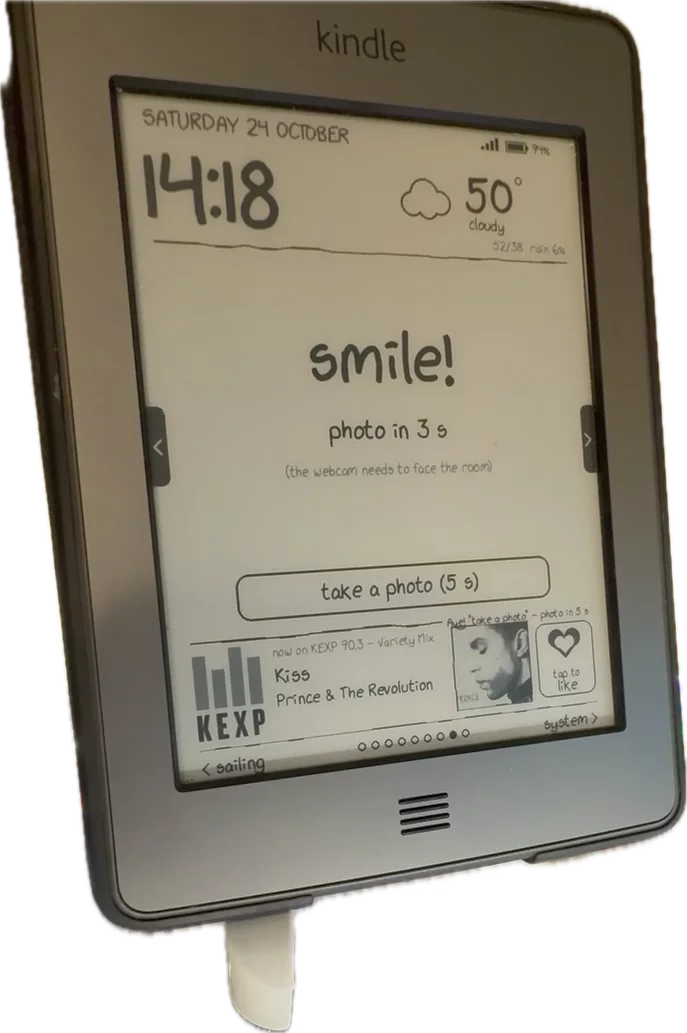

La webcam observa el tablero
The dashboard shows the score, the time, and the current end. El tablero muestra el marcador, la hora y el end actual.
It also shows a live feed from the curling club’s webcam. También muestra una transmisión en vivo de la webcam del club de curling.
The skip’s strategy
The skip is a genius. El skip es un genio.
He’s got a plan for every possible scenario. Tiene un plan para cada escenario posible.
“If they throw a takeout, we’ll do this,” he says. “Si hacen un takeout, haremos esto”, dice.
“If they throw a double takeout, we’ll do that.” “Si hacen un double takeout, haremos aquello”.
“If they throw a burned stone, we’ll… well, we’ll figure it out.” “Si lanzan una piedra quemada, haremos… bueno, lo resolveremos”.
The vice’s observations
The vice is not a genius. El vice no es un genio.
He’s just observing. Simplemente está observando.
“He’s going to throw a takeout,” the vice says. “Van a hacer un takeout”, dice el vice.
“No, he’s going to throw a peel,” someone else says. “No, va a lanzar un peel”, dice otra persona.
“He’s going to throw a double takeout,” the skip says. “Va a hacer un double takeout”, dice el skip.
“He’s going to throw a burned stone,” the vice says. “Va a lanzar una piedra quemada”, dice el vice.
The lead’s anxieties
The lead is nervous. El lead está nervioso.
He’
La misma webcam puede ver el Kindle de la sala. Cada pocos minutos, el fotograma más reciente va al modelo de visión local de la PC con un prompt corto: ¿qué hora muestra el Kindle? Si la hora que lee está más de tres minutos retrasada durante diez minutos, la laptop recibe una notificación. Es la prueba de extremo a extremo la que detecta lo que los registros no: un Kindle que sigue reportándose pero mostrando una pantalla congelada. Los fotogramas permanecen en memoria.
Sailing
Un proyecto separado ejecuta una simulación de navegación con un piloto automático en la PC. La página de navegación dibuja la embarcación en un mapa de la costa (datos de Natural Earth) con flechas de viento y la ruta planificada, y sus botones ajustan el rumbo o devuelven el control manualmente al piloto automático. También funciona la voz: encender piloto automático. Está escondido en el Kindle del dormitorio — sin timonear desde la cama.
Home Assistant
El Kindle del dormitorio y Home Assistant
El Shift P y el Shift Space del Kindle del dormitorio llaman a la API REST de Home Assistant para reproducir Canciones Favoritas en el estéreo y para pausar. Esto es el comienzo de un plan más grande: un catálogo de acciones, definido una vez en Home Assistant, compartido por los Kindles, los comandos de voz de la habitación, Siri, Google y Alexa. Todavía no funciona — el token de acceso no se ha creado.
Notifications
Monitoreo de Kindle: ¡No te pierdas una alerta!
Un perro guardián en el servidor envía una notificación de escritorio cuando el Kindle deja de reportarse por cinco minutos, cuando su batería baja del 15% y no está cargando, o cuando falla la verificación de la cámara web.
Sleep screens and banners
En el Kindle del dormitorio, el hack del salvapantallas muestra imágenes de una carpeta cuando el dispositivo está en reposo. Cada seis horas, el cliente sincroniza ocho fotos recientes del booth y ocho cómics en caché de xkcd en él, cada uno drawn en el servidor como una página de 600×800 con un pie de foto.
$ tail -4 log.txt
2026-10-29 07:25:44 start 3038452b
2026-10-29 07:25:51 sleep screens: 15
2026-10-29 13:25:51 sleep screens: 15
2026-10-29 19:25:52 sleep screens: 16
# 16: a new booth photo arrived between syncs
En el Touch, la pantalla de bloqueo y el banner inferior de la biblioteca solían mostrar ofertas especiales de Amazon. El dispositivo lleva mucho tiempo sin soporte y las ofertas habían expirado hace mucho, así que los espacios mostraban un marcador de posición de "oferta faltante". Un script crea banners de reemplazo y pantallas de reposo con líneas rotativas de Doctor Who (la red Wi-Fi tiene un nombre de Doctor Who), y el Kindle las instala en los espacios vencidos, manteniendo una copia de seguridad para "deshacer".
The system page
Every check-in carries a few diagnostics, and the server adds its own: when each Kindle last checked in, battery and temperature, Wi-Fi signal, whether the Kindle's clock is right, free memory, uptime, whether the Kindle's script is the current version (an MD5 prefix compared with the server's copy), whether SSH is on, and the state of every service the dashboard depends on — the microphone, the webcam, the screen check, the autopilot, KEXP, the weather, Spotify, the last digest. Problems are listed first. It's the page I look at when something seems off.
Privacy: a line that moved once
Durante los dos primeros días, el panel de control era accesible desde la red más amplia del edificio a través de un reenvío de puertos en mi router. Debido a eso, no contenía nada personal: la fecha, el reloj, el clima y titulares públicos. El token en la ruta era la única cerradura.
Una vez que ambos Kindles estuvieron en mi propia red, eliminé la redirección de puertos. El servidor ahora responde solo a las direcciones de mi red doméstica (cualquier otra cosa recibe un 403), y solo entonces aparecieron los títulos del calendario y los asuntos del correo. Algunas reglas no han cambiado: los cuerpos y resúmenes del correo nunca van por HTTP, los fotogramas de audio y webcam nunca se escriben en el disco (excepto las fotos del stand, a propósito), y nada registra los títulos de las canciones ni el token. Si algo alguna vez expone el panel de control más allá de la red doméstica de nuevo, vuelve a mostrar solo conteos.
Lo que le diría a mí mismo el primer día
The Basics
- Don't be a hero.
- Don't try to draw the house. Seriously.
- The hack is your friend. Use it.
- You're not going to skip it. Just accept it.
- Your vice is probably better than you. Let them play it.
- The lead is there to make you look bad.
- The second is there to tell you what you did wrong.
- The end is a cruel mistress.
The Stones
- A pebble is just a rock that hasn't found its purpose yet.
- A stone is a rock that's about to cause you a lot of stress.
- A rock is a rock. Sometimes it curls. Sometimes it doesn't.
- The broom is your only friend. Treat it well.
- Sweeping is an art. You are not an artist.
- Don't burn a stone. It's bad luck. And embarrassing.
The Strategy
- Takeouts are fun. But they're also risky.
- A burned stone is a learning opportunity. (Or a cry for help.)
- The sheet is a fickle thing.
- The running band is a myth.
- Don't worry about the hog line. Worry about the people laughing at you when you cross it.
- A good spiel is worth a thousand takeouts.
- A bad bonspiel is a story for the ages.
The People
- Your teammates are your family. (The ones you choose.)
- Pon la lógica en el servidor. Es la decisión en la que todo lo demás se basa.
- Utiliza long-poll antes de construir cualquier canal de push. Una solicitud HTTP mantenida abierta hizo que los Kindles se sintieran instantáneos.
- Reporta diagnósticos en cada solicitud, y construye una página del sistema temprano. La mitad de los errores se encontraron leyendo esa página.
- Haz que cada fallo sea visible en la pantalla, y devuelve el dispositivo a su interfaz de usuario normal cuando no puedas alcanzarla.
- Busybox te sorprenderá.
grep -E,head -c,ping -W,command -v,od,nohupysetsidfaltaban en uno u otro dispositivo. - Nunca ejecutes un comando de inicio de demonio a través de una tubería capturada.
- "Solo lectura" no es libre de efectos secundarios cuando hablas con los dispositivos de otra persona. El protocolo Cast es un buen ejemplo.
- Consigue que SSH funcione temprano, para que los cables USB dejen de ser la herramienta de despliegue.
Still open
- Moviendo el servidor a la PC. Funciona en mi laptop hoy, así que los Kindles se desconectan cuando la laptop duerme.
- Acciones de Home Assistant para el Kindle del dormitorio, reproducir y pausar.
- Gustos por todas partes: Spotify, YouTube Music, Plex y los Kindles sincronizados.
- Una configuración para viajar para el Touch, ya que Tailscale no puede correr en él.
By the numbers
El Kindle como Servidor de Juegos de Curling (y otras locuras)
Bueno, aquí estamos de nuevo. Después de mi último proyecto, que involucró una cantidad alarmante de código para hacer que una tostadora mostrara un GIF de un gato, pensé que ya había visto de todo. Pero no. Ahora tengo Kindles. Dos, para ser exactos. Y los estoy usando para jugar al curling.
Sí, curling.
No me juzguen.
| Kindle Touch (sala de estar) | Kindle Keyboard (dormitorio) | |
|---|---|---|
| Año, firmware, kernel | 2011, 5.3.7.3, 2.6.31 | 2010, 3.4, 2.6.26 |
| Entrada | Táctil (zforce, 0–4095), Botón de inicio | Teclado, pad de 5 vías, botones de página |
| Cliente | ~480 líneas de sh y awk de busybox | ~310 líneas de Python 2.7 |
| Iniciado desde | Menú KUAL | Shift D (Launchpad) |
La historia es larga, pero básicamente, estaba buscando una forma de ejecutar un simulador de curling en algo más que mi cerebro. Y, por alguna razón, pensé que un Kindle sería la solución perfecta.
No preguntes.
El caso es que ahora tengo dos Kindles, uno en la sala de estar y otro en el dormitorio, ambos ejecutando una versión muy, muy modificada de un simulador de curling. Y, sí, es tan ridículo como suena.
Pero antes de que me pregunten, no, no puedo explicar cómo llegué a esto. Es una historia que involucra demasiados cafés, demasiadas noches sin dormir y una cantidad preocupante de tiempo
Compartido: un servidor de tablero (~2,200 líneas de Python), un contenedor de reproducción actual en la PC (~590 líneas), un oyente de Cast de solo lectura (~310 líneas) y once páginas.